.svg)
.svg)

.svg)
.svg)

Copied to Clipboard

Ready to get Started?


Key Takeaways
Get payroll right from day one: Mistakes in classification, taxes, or compliance are costly and hard to fix later.
Build a simple, consistent system: Clear processes for pay, deductions, and schedules keep payroll smooth and compliant.
Don’t rely on manual payroll for long: It works short-term, but software or expert support is essential as you grow.
To pay employees compliantly, you need to classify workers correctly, calculate gross pay, apply the right taxes and deductions based on local laws, and pay them on a consistent schedule using a reliable payroll system.
Simple enough, right? Maybe in one country. But running global payroll becomes a juggling act when operating in multiple countries where you’re dealing with things like tax registrations and compliance rules across different jurisdictions, where mistakes can be costly.
Payroll sits at the intersection of finance, legal compliance, and employee trust, and while the core principles stay the same, complexity increases quickly as you scale. This is where having a clear, structured approach becomes essential.
This guide breaks payroll down into practical steps so you can set it up correctly from day one, from classifying workers to staying compliant as your team grows.
How to Pay Employees: A Quick Checklist
Before you run your first payroll, you need a few essentials in place. At a minimum, this includes registering your business for tax purposes (like an EIN in the U.S. or local equivalent), collecting employee details and statutory forms, and confirming how you’ll actually pay your team.
Then define your payroll setup so it runs consistently from day one:
- Decide on Pay Frequency: Decide how often you’ll pay employees (weekly, biweekly, semi-monthly, or monthly), but make sure it complies with local laws. In the U.S., for example, federal law doesn’t mandate a schedule, but many states do (e.g. weekly or biweekly requirements for certain worker types). In other countries, monthly pay is standard or legally required.
- Choose Compensation Type: Choose between salaried and hourly workers, and define how overtime, bonuses, or commissions will be handled.
- Identify Deductions:Confirm what must be withheld (taxes, social contributions) and what’s optional (benefits, retirement contributions), based on local laws.
- Decide on a Payroll Method: Consider whether you’ll run payroll manually, use payroll software, or outsource to an expert global payroll services provider.
- Setup a Payroll Workflow: Define how payroll runs operationally, including how hours are tracked, who approves payroll, when calculations are finalized, and how payments are released
- Ensure Accurate Recordkeeping: Store payslips, tax filings, and employee data in an organized system from day one. Most countries require several years of retention, so getting this right early reduces risk later
Set Competitive Salaries from Day One
Before you run payroll, make sure your compensation aligns with local market rates. Playroll’s Salary Benchmarking Tool gives you real-time insights so you can set pay confidently.
Explore Our Tool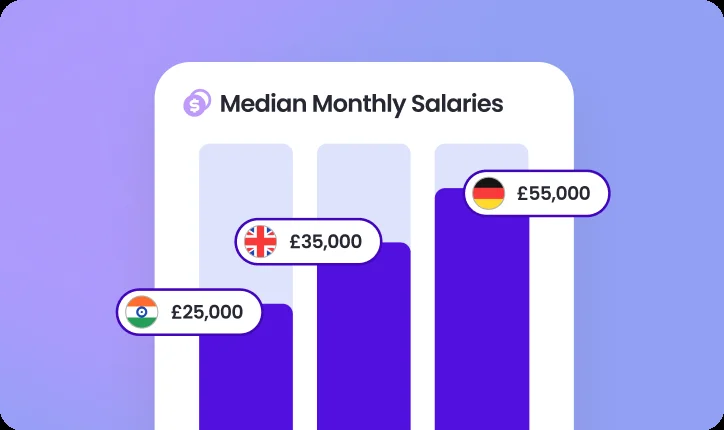
8 Steps to Pay Your Employees When You’re Starting a Business
If you’re new to payroll, focus on getting the fundamentals right. These steps are designed to help you build a system that works now and scales later. Let’s get into it.
Step 1: Classify Workers Correctly
Misclassification is still one of the most common and costly payroll mistakes. You’ll need to determine whether a worker should be classified as an employee or contractor before paying them, because this defines your legal and tax obligations.
At a high level:
- Full-time employees are part of your payroll, meaning you withhold taxes, contribute to social programs, and follow labor laws.
- Contractors on the other hand, operate independently and handle their own taxes.
The distinction usually depends on control (how work is done), financial independence, and the nature of the relationship. If you’re unsure, don’t guess – get professional advice to avoid potential legal consequences. Getting this right upfront avoids back payments, penalties, and legal disputes later.

Employee vs Independent Contractors For Payroll
Important to Note: We’re going to be using the U.S. as an example. Bear in mind that details may differ per jurisdiction.
The core difference comes down to tax responsibility and legal obligation. With an employee, you withhold income tax, Social Security, and Medicare from every paycheck, and contribute employer-side payroll taxes on top. With an independent contractor, you pay their invoiced amount in full; no withholding, no employer taxes. They handle their own tax obligations.
The practical implications for payroll:
- Employees receive a W-2 form at year-end; contractors receive a 1099-NEC form (if paid over $600 in the U.S.)
- Employees are entitled to benefits, overtime, and labor law protections; contractors are not
- Misclassifying an employee as a contractor exposes you to back taxes, penalties, and audits, the IRS uses the ABC test to determine the correct classification when it's disputed
Step 2: Set Up Your Payroll System
Before you run payroll, you need a system that ensures employees are paid correctly and taxes are handled properly. We’ll use an example in the U.S.: the process starts with understanding how pay flows from gross to net.
Every payroll follows the same structure:
- Gross Pay: Total earnings (salary or hours worked + any bonuses)
- Deductions: Federal income tax, Social Security (6.2%), Medicare (1.45%), and any state taxes or benefits
- Net Pay: What the employee actually receives after deductions.
Let’s say you hire your first employee, Sarah, on a $60,000 annual salary. If she’s paid monthly, her gross pay is $5,000, but if she’s on a typical U.S. bi-weekly schedule (26 pay periods), her gross pay would be about $2,308 per paycheck.
After federal taxes and Federal Insurance Contributions Act (FICA) deductions, plus any state taxes, her take-home pay will be lower, typically in the ~$3,500–$4,000 monthly equivalent depending on her tax setup.
To get set up, you’ll need to:
- Apply for an Employer Identification Number (EIN) with the IRS
- Register for state payroll taxes (if applicable)
- Collect a Form W-4 (Employee’s Withholding Certificate) and Form I-9 (Employment Eligibility Verification)
- Choose how you’ll run payroll (manual, software, or outsourced through an EOR)
Choose Payroll Administration
There’s no one-size-fits-all answer. The right option depends on your team size, where your employees are based, and how much complexity you’re willing to manage internally. You have a few great options to choose from.
- In-House Payroll: You keep full control over payroll and protect sensitive data on your premises. However, you take on all the responsibility of managing software, staying on top of changing laws, and must invest considerable time and resources.
- Payroll Software: Automates calculations, tax updates, and reporting. It reduces errors and saves time. But you rely on the software and may face setup costs or support issues.
- Outsourced Payroll Provider or EOR: Saves time and cost by bringing experts on board to run payroll processing and handle compliance across borders. It gives you scale without having to build an internal team.
- Pro Tip: Look for software that allows for easy adoption and syncs with your existing workflows so your team can keep building.
Run Payroll Anywhere, Without the Complexity
As your team grows beyond one location, payroll gets harder to manage. Playroll unifies your global payroll operations into one dashboard, with built-in compliance, real-time visibility, and seamless payments.
Speak to an Expert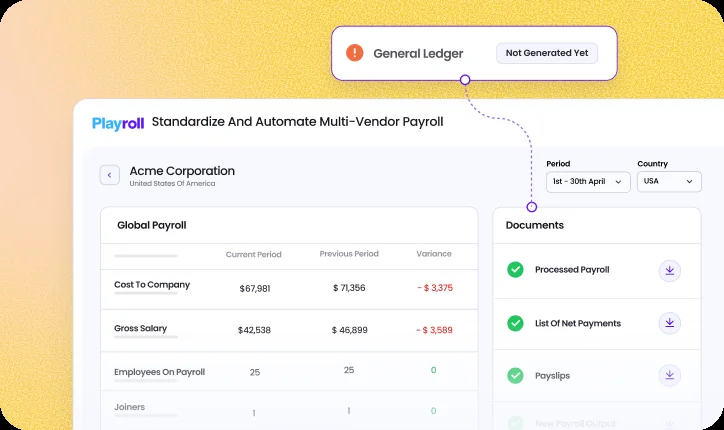
Step 3: Ensure Compliance with Labor Laws
In the U.S., payroll compliance is driven by federal, state, and sometimes local laws. Even with one employee, you’re responsible for following them.
At a minimum, you need to:
- Meet minimum wage laws (federal or state, whichever is higher)
- Pay overtime (1.5x) for eligible hourly employees over 40 hours/week
- Withhold and remit federal and state payroll taxes
- File reports like Form 941 (quarterly) and W-2s (annually)
If Sarah is a salaried, exempt employee, you won’t need to track overtime. But if she were hourly, you’d need to track hours carefully and pay overtime if she exceeds 40 hours in a week.
Step 4: Determine the Type of Compensation You Offer Employees
Before you run payroll, you need to decide how you’re going to pay your employees. For most companies, this comes down to a simple choice between salaried and hourly employees.
Salaried vs Hourly Employees For Payroll
Salaried employees receive a fixed paycheck each cycle, while hourly employees are paid based on time worked and may qualify for overtime.
- Salaried: Predictable pay, simpler payroll
- Hourly: Flexible, requires time tracking and overtime calculations
Let’s say you decide to pay Sarah a $60,000 salary, paid biweekly. That means she earns about $2,308 per paycheck, regardless of hours worked.
Step 5: Calculate Employee Pay and Tax Deductions
Now you calculate what your employee actually takes home. In the U.S., this includes federal taxes and FICA contributions.
From Sarah’s $2,307 biweekly paycheck:
- ~$176 goes to Social Security
- ~$33 goes to Medicare
- Federal and state taxes are withheld based on her W-4
Her final take-home pay will be lower than gross, but all required taxes are covered. As an employer, you’ll also match Social Security and Medicare contributions on top of her salary.
Step 6: Choose the Right Payment Methods
Once you’ve chosen how you’re running payroll (manually, through software, or via an outsourced provider), the next step is deciding how employees actually get paid. In most cases, your payroll setup will determine the options available to you.
For U.S.-based teams running payroll in-house, the standard methods are:
- Direct Deposit: This is the most common option. If you’re using payroll software or an outsourced provider, payments are typically built in, so once payroll is approved, your employee (like Sarah) is automatically paid on schedule. If you’re running payroll manually, you’ll need to initiate each bank transfer yourself.
- Paper Checks: These are still used by some small businesses, but the process is fully manual. You’ll need to calculate payroll, issue checks, and manage delivery, which increases the risk of delays or errors.
- Payroll Cards: These are prepaid cards that wages are loaded onto, making them useful for employees without bank accounts. They’re usually supported through payroll providers rather than manual setups.
As your team grows, especially across different locations, coordinating payments manually becomes harder to manage. That’s typically when businesses move toward payroll systems or providers that can handle payroll, payments, and detailed multi-vendor reporting in one place.
Step 7: Set Up a Payroll Schedule
The right payroll schedule depends on your industry and your team’s preferences – and it can make all the difference in how smooth payroll feels. Let’s break down the most common schedules and how to pick one that fits your global operations:
- Weekly: This means running payroll every week, which works well for hourly or frontline workers. It takes more work, but it fits cash payments-first operations.
- Biweekly: You pay every two weeks (26 times a year). This is the most common pay rhythm in the U.S., with 43 percent of companies using it. You can download our free payroll schedule here.
- Semi-Monthly: You pay twice a month (24 times annually), usually around the 1st and the 15th. It aligns nicely with monthly reporting.
- Monthly: You pay once a month. This is the least common choice in the U.S. (only about 4% of companies use it). This pay schedule is easy on admin, but harder for cash flow and harder for hourly workers.
Step 8: Recordkeeping and Reporting
Payroll doesn’t end when you send payment. You’re required to keep records and file reports with the IRS and state agencies.
At a minimum, keep:
- Payroll records and pay stubs
- Tax filings (e.g. Form 941, W-2s)
- Employee forms (W-4, I-9)
Retention requirements:
- IRS: At least 4 years
- Department of Labor: 2–3 years depending on record type
You keep all of Sarah’s payroll records stored digitally, including her pay history and tax filings, so you’re prepared if the IRS ever audits your business. Using payroll software makes this much easier by automatically storing and organizing records.
What’s the Best Way to Pay Employees: Manual Payroll vs. Payroll Software?
The best way to pay employees depends on your stage as a business. Manual payroll can work when you’re just starting out, but most teams quickly outgrow it as complexity adds up.
When Manual Payroll Makes Sense
Manual payroll works when you have one or two employees, straightforward salaries, and minimal compliance requirements. It gives you full control and avoids software costs, but it also means you’re responsible for calculations, filings, and staying up to date with tax rules.
For most companies, this is a short-term solution. It’s easy to start here, but it becomes time-consuming and risky as soon as anything changes. It also means you’ll likely need to hire an internal, local payroll expert, or you’ll be highly dependent on upskilling new people as you scale. Both options are resource intensive.
When Payroll Software Makes Sense
Payroll software becomes the better option as soon as you want less manual work and accuracy at scale. It automates tax calculations, deductions, filings, and reporting, reducing the risk of errors and missed deadlines.
If you’re growing, hiring across states, or planning to expand internationally, quality software often becomes a must-have.. Platforms like Playroll take this further by giving you a single view across all payroll operations, helping you stay compliant without adding operational overhead.
What Does Payroll Actually Cost the Employer Beyond Wages?
Employee wages are only part of the total cost of payroll. As an employer, you also need to budget for taxes, contributions, and benefits that sit on top of salary.
In the U.S., the biggest additional costs include:
- Employer Payroll Taxes: You match Social Security (6.2%) and Medicare (1.45%) contributions under the Federal Insurance Contributions Act (FICA)
- Federal and State Unemployment Taxes: Federal Unemployment Tax Act (FUTA) and State Unemployment Tax Act (SUTA) contributions vary by state and employer history
- Workers’ Compensation Insurance: Required in most states, with costs depending on role risk level
- Benefits (if offered): Health insurance, retirement contributions (e.g. 401(k)), bonuses, and paid leave
Simplify and Scale Your Payroll as You Grow
Payroll gets more complex as your business grows, especially when you start hiring across states or countries. What begins as a simple process can quickly turn into multiple systems, fragmented data, and increasing compliance risk.
Playroll helps you bring everything into one place. You can consolidate payroll data into a single dashboard, automate calculations and compliance checks, and maintain real-time visibility across every region you operate in, without replacing your existing providers.
The result is fewer errors, less admin, and full confidence that your payroll is running correctly, whether you have one employee or a global team. If that sounds like something you’re keen on, book a demo with our team today and let’s get started.

ABOUT THE AUTHOR
Jaime Watkins
Jaime is a content specialist at Playroll, specializing in global HR trends and compliance. With a strong background in languages and writing, she turns complex employment issues into clear insights to help employers stay ahead of the curve in an ever-changing global workforce.
How To Pay Employees FAQs
How do you pay offshore employees?

.png)
You can pay offshore employees through local payroll providers, as independent contractors, or by using a global payroll platform, depending on your structure and compliance requirements in each country.
What is the best way to pay employees?
The best way to pay employees for most new businesses is to use payroll software, as it reduces manual work, improves accuracy, and helps you stay compliant as you grow.
How often should you pay employees?
You should pay employees on a schedule that aligns with local laws and expectations, typically weekly, biweekly, semi-monthly, or monthly depending on your workforce and location.
What types of payment can an employer use to pay employees?
Employers can pay employees using direct deposit, bank transfers, payroll cards, or checks, depending on what’s most accessible and common in your region.
How do I avoid payroll compliance mistakes?
You can avoid payroll compliance mistakes by correctly classifying workers, following local labor laws, keeping accurate records, and using payroll tools or experts as your business grow

Back to Top
.svg)










.svg)