.svg)
.svg)

.svg)
.svg)

Copied to Clipboard

Ready to get Started?

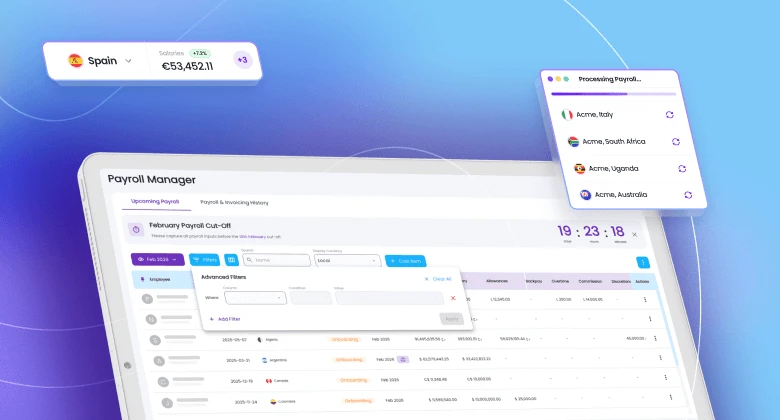
Payroll is one of the most important parts of running a global team, and one of the hardest to fully understand.
As teams scale across countries and currencies, payroll becomes more complex and the risk of fragmentation increases. Payroll data, employee costs, and invoices often live in separate places, making it difficult to see how everything connects.
That lack of visibility creates friction. Finance teams spend time reconciling reports, operations teams chase explanations, and changes between payroll cycles are hard to spot or explain. Even when payroll is correct, it doesn’t always feel clear. And when payroll goes wrong, trust breaks down and operations slow.
That’s exactly why we built Payroll Manager, an all-in-one way to bring clarity, context, and confidence to payroll.
What is Payroll Manager?
Payroll Manager gives you a clear, end-to-end view of payroll results and how they translate directly into invoices. Instead of piecing together reports or relying on manual checks, you now have a single, structured place in the Playroll dashboard to understand:
- What was paid
- Why it changed
- How it impacts your billing
It turns payroll from a black box into something you can confidently review, explain, and trust cycle after cycle.
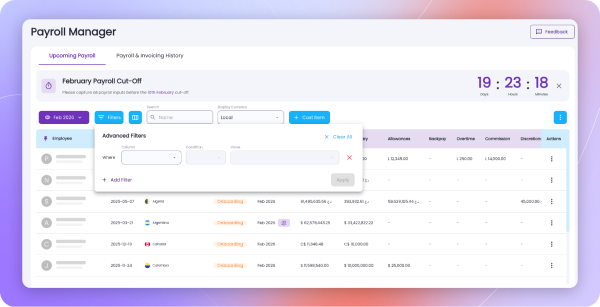
Who Payroll Manager is for
Payroll Manager is built for teams that need visibility without added complexity, including:
- Finance teams who want confidence in payroll outcomes and invoice accuracy.
- Operations and People teams managing growing, distributed workforces.
- Founders and leaders who need clear answers without digging through reports.
If you’ve ever asked:
- Why did this invoice change?
- How much does this employee really cost?
- What changed between last month and this one?
Payroll Manager is for you.
What’s Improved
Payroll and billing are now directly connected, making it easy to understand how payroll outcomes flow into invoices.
With Payroll Manager:
- Payroll results and invoice totals are clearly linked
- Employee costs are visible, traceable, and consistent over time
- Monthly changes are easy to spot and explain
- Historical payroll data is simple to explore
This gives you greater confidence in payroll, fewer stakeholder questions, and smoother month-end reviews.
Common Ways Teams Use Payroll Manager
Understand payroll at an employee level
View payroll results per employee, see how each individual contributes to total costs, and track payroll history from their start date. This is especially useful for headcount planning, budgeting, and audits.
Track payroll changes over time
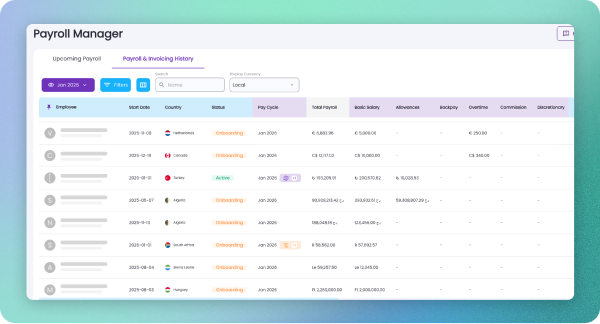
Compare payroll cycles to quickly see what changed and why – whether it’s a salary update, leave adjustment, one-off payment, or FX movement. Variance checks become faster and far less manual.
Connect payroll directly to invoices
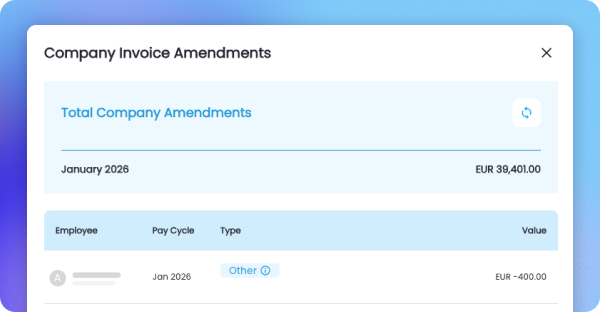
See exactly how payroll results roll up into invoice totals, giving invoices the context they’ve historically lacked. This means fewer follow-ups, quicker reviews, and more confident approvals.
Add and manage payroll costs in seconds

Quickly add new cost items like bonuses, commissions, or allowances ahead of an upcoming payroll, all in one place. Team admins can make last-minute adjustments without jumping between systems or spreadsheets, ensuring everything is captured accurately before payroll is processed.
How To Get Started With Payroll Manager
Getting value from Payroll Manager is straightforward:
- Open Payroll Manager
Navigate to Payroll Manager from your dashboard and select a payroll cycle. - Explore payroll results
Review employee outcomes, totals, and detailed breakdowns for the selected cycle. - Understand billing impact
See how payroll data feeds directly into invoice totals and billing views. - Review historical data
Move between cycles to track changes over time and build confidence month after month.
Key Takeaways
Payroll Manager is designed to turn payroll from something you react to into something you truly understand. With clearer visibility and better context, teams gain confidence, control, and trust as they scale globally.
With Payroll Manager, payroll clarity is baked into the process from end to end.
To learn more about getting started, explore our support guides here.

ABOUT THE AUTHOR
Marcelle van Niekerk
Marcelle is a skilled Content Manager at Playroll, a leading global HR platform. With a passion for storytelling and a keen eye for trends, Marcelle specializes in crafting insightful content about remote work, global employment, and the evolving dynamics of the modern workforce.
Introducing Payroll Manager: Full clarity across payroll cycles FAQs
What rollout controls should be used for new payroll features?

.png)
Use phased rollout gates with test payroll groups and defined rollback criteria so new features can be validated without disrupting live employee payments.
How should teams verify payroll data quality after a release?
Post-release validation should compare gross-to-net outputs, statutory deductions, and journal totals against prior approved baselines before full rollout.
What security checks matter most in payroll product updates?
Critical checks include access-control reviews, secret management, and API abuse protections because payroll systems contain high-value identity and compensation data.
How can operations teams reduce change-related support tickets?
Support load drops when release notes include user-impact summaries, known limitations, and exact owner contacts for payroll, finance, and HR operations.
Which metrics indicate a successful payroll platform enhancement?
Track cycle completion time, exception rate, rework hours, and on-time payment rate across multiple payroll cycles to confirm measurable operational improvement.

Back to Top
.svg)







.svg)